Palo
Chrome extension for YouTube chat, summaries, and timestamped answers.
Fall 2024 · AI tooling · Active project
Stack
Stack: Manifest v3 · JavaScript · Gemini · ExtPay · GitHub Pages
Chrome extension — the content script handled the YouTube page and sent messages to the service worker for extension-level work. Transcript access depended on an external source.
Log
Sep 2024 — the pain
Drowning in video content. Finding the right video is only half of it; for me, locating the one specific minute inside it was the hard part. Scrubbing, skimming, pausing, repeating. The next thing I built had to make that motion easier.
Spring 2024 — ClipChat, the first attempt
Simple chat interface inside YouTube, powered by an LLM, answers questions from the transcript. Built it for APUSH note-taking. The early concept lived on grid paper before it lived in code.
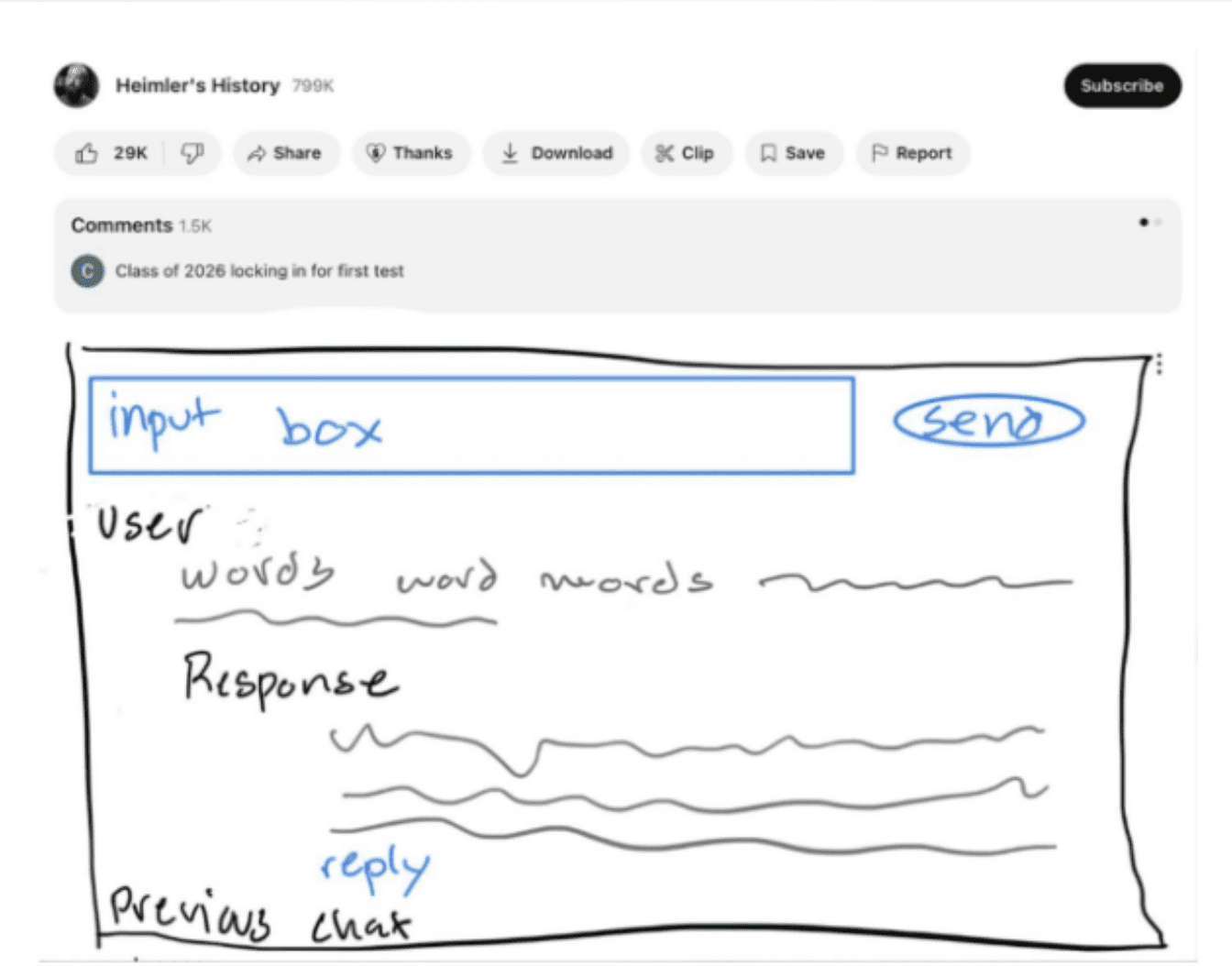
Spring 2024 sketch: a chat box sketched directly under YouTube. Spring 2024 — why ClipChat didn't work
The UI/UX was clunky. Searching inside the video wasn't intuitive or effective for me, and ClipChat did not yet have a clear product loop. I shelved it.
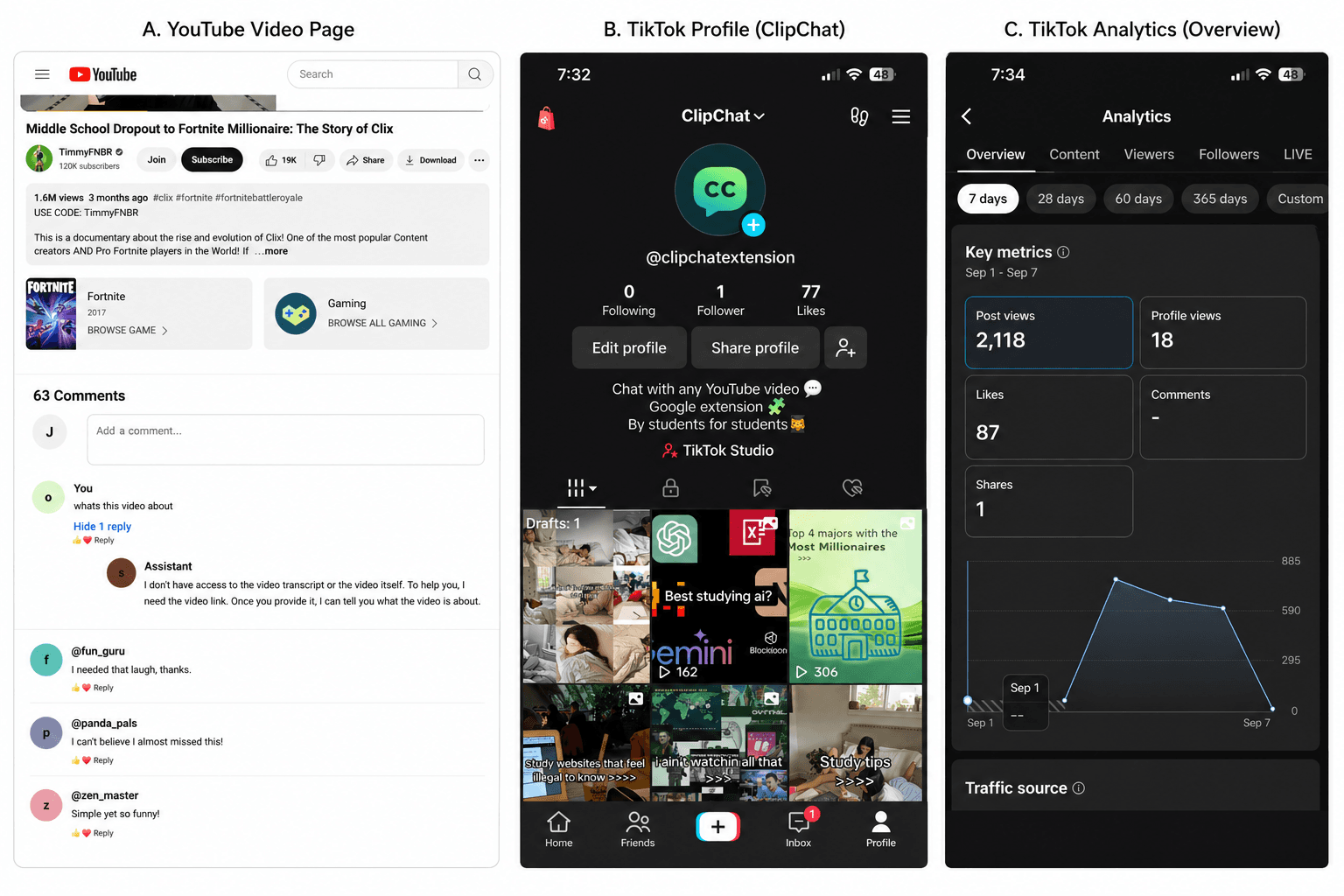
Historical ClipChat and launch-channel snapshots from the first attempt. Summer 2024 — sketching v2 on grid paper
Different modes, better searching, better interface. A sidebar that didn't fight the YouTube layout, with a 'chat' tab and a 'search' tab that returned timestamped results.
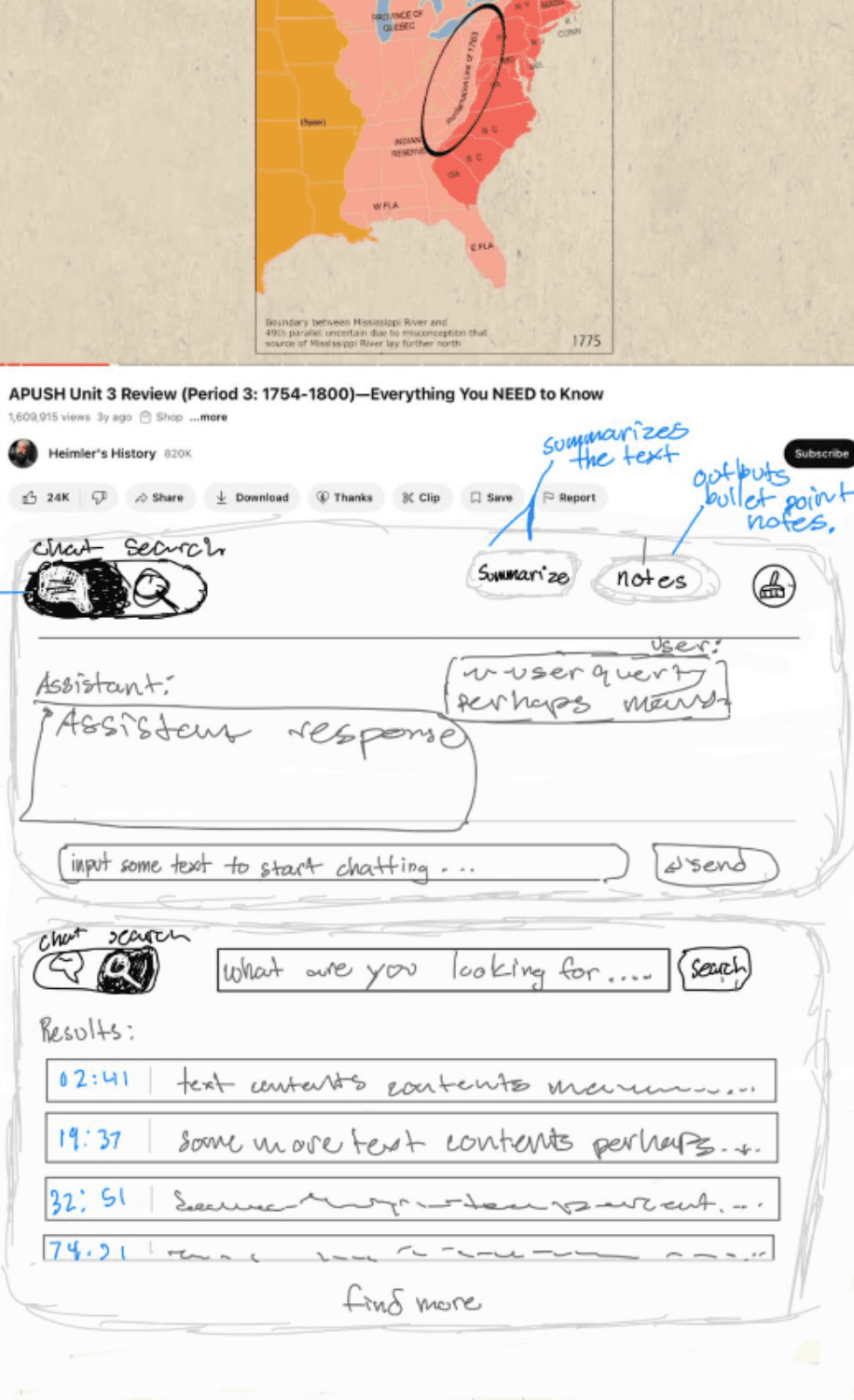
Summer 2024 sketch: search results tied to timestamps. Nov 2024 — Palo, the rewrite
Instant summaries, ask questions, jump to key moments — all without leaving the YouTube interface. Same APUSH Unit 4 video as before, but this time the assistant tells me the Louisiana Purchase was a big win for America that put Jefferson in a constitutional bind, and hands me [02:19] as a link.
Nov 2024 — three things in a trench coat
Palo brought together the YouTube page, a transcript source, and Gemini. The content script added the sidebar; when I asked a question, Palo sent the video transcript and question to Gemini to generate a response.
Nov 2024 — anatomy of a Chrome extension
manifest.json holds the metadata — name, version, permissions, and file list. The content script handled the YouTube page and sent messages to the extension service worker for extension-level work. The project also had a guide.html, options.html for settings, and plans.html for the paid tier.
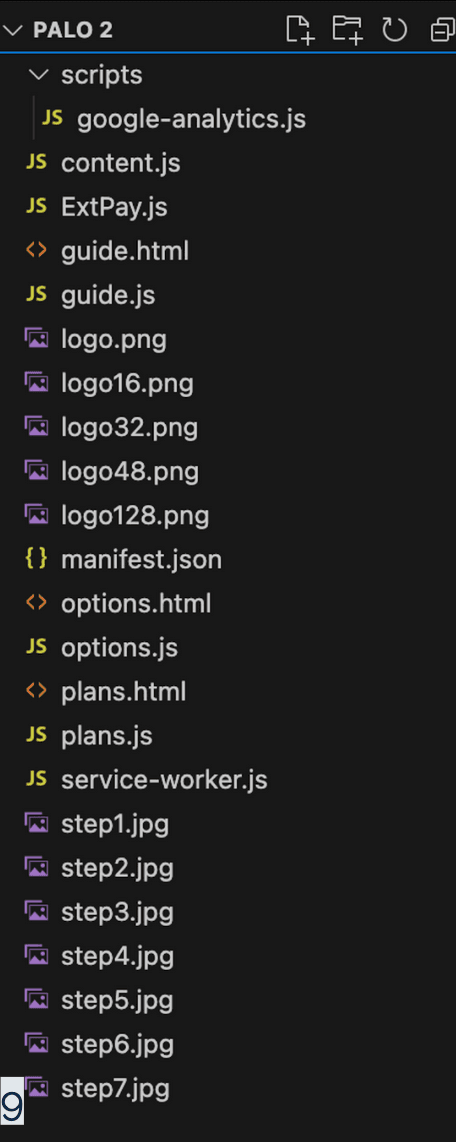
November 2024 project snapshot: content script, worker, options, plans, guide, and assets. Nov 2024 — the prompt
The Gemini prompt paired the video transcript with metadata, the running chat, and the user's question. It also set the response style and asked Gemini to format timestamps as [mm:ss]. That gave the answer a way back to a specific moment in the video.
![Dark-themed code editor showing a JavaScript template literal called format_prompt — pseudo-XML tags <system_prompt>, <output_style>, <timestamp_guide>, <timestamp_formatting>, <video_metadata>, <video_transcript>, <chat_history>, <user_message> — inside, instructions to keep responses short and conversational and to format every timestamp as [mm:ss]](/_next/image?url=%2Fjournal%2Fpalo%2Fgemini-format-prompt.png&w=3840&q=75)
November 2024 prompt snapshot: transcript and question sent to Gemini together. Nov 2024 — making timestamps clickable
A regex .replace finds every [mm:ss] in the assistant's response, converts it to total seconds, and rewrites it as an <a> with an onclick that grabs the page's <video> element and sets video.currentTime. A second .replace chain converts asterisks and \n into <strong>, <em>, <br>. The output is a chat bubble where every cited time is a real link into the video.
![Dark-themed code screenshot showing JavaScript response.replace logic for [mm:ss] timestamps — it calculates total seconds, builds a YouTube URL, emits a clickable message-timestamp anchor that sets video.currentTime, then converts bold, italic, and newline markdown into HTML](/_next/image?url=%2Fjournal%2Fpalo%2Fclickable-timestamp-replace-code.png&w=3840&q=75)
November 2024 code snapshot: response timestamps became jumps in the video. Nov 2024 — background message listeners
service-worker.js became the control room: analytics events, tab reloads, paid-user checks through ExtPay, Stripe opens, quota resets, and options/plans routing all lived behind one message listener. The content script handled the page; the worker handled extension-level routing and services.
Nov 2024 — Chrome Web Store upload
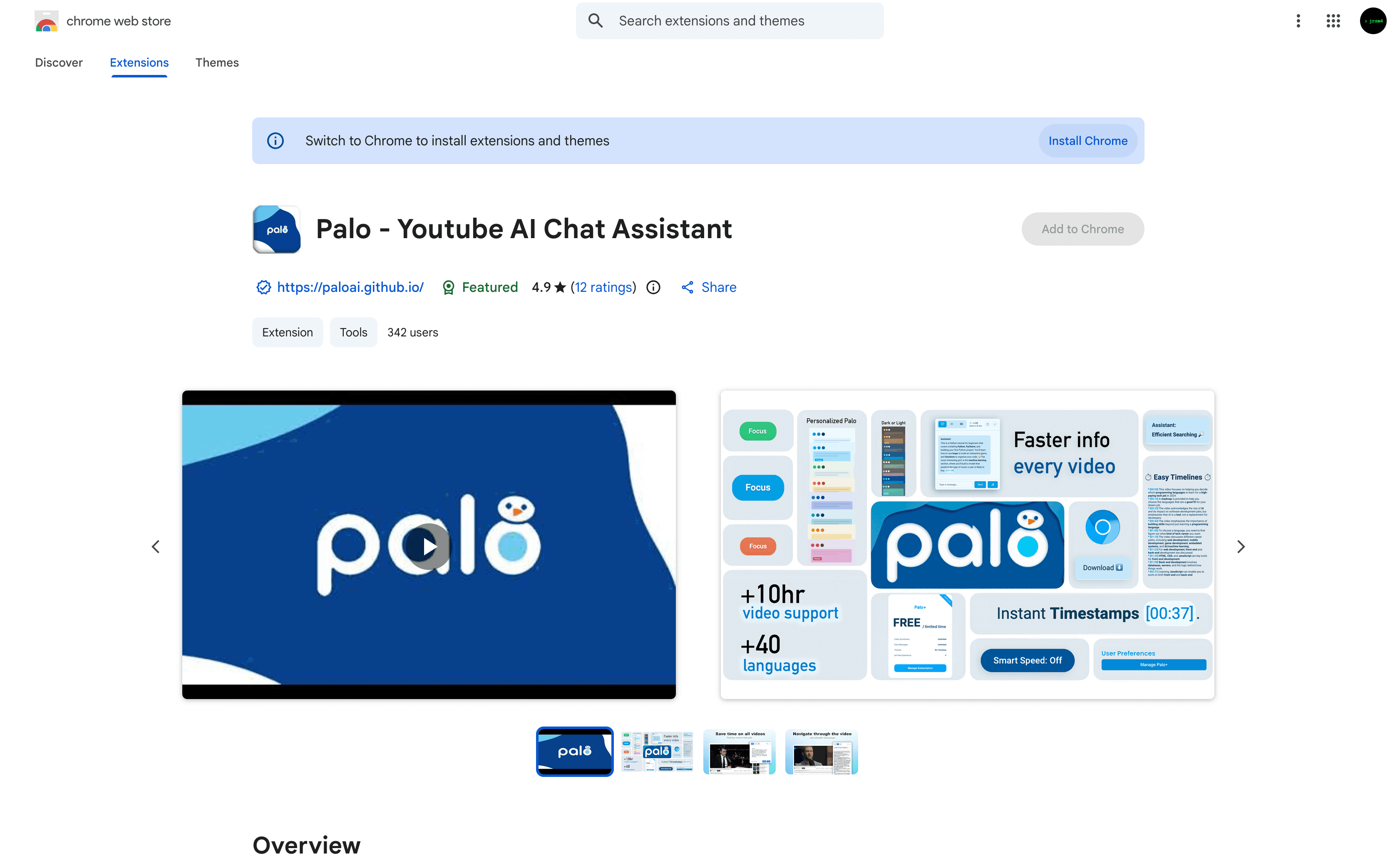
The listing for 'Palo - Youtube AI Chat Assistant' had an icon, website, promo video, feature screenshots, and a Featured badge. The screenshot preserves how the public listing looked in November 2024.
November 2024 snapshot of the listing; visible counts are from that moment. Oct 2024 — the landing page
paloai.github.io. Blue curved header, the Palo logo and bird mark, a row of yellow stars, a white 'Install on Chrome' button next to a blue 'Learn More'. Below that, a screenshot of the extension on a 'Why is this number everywhere? 37' video.
Oct 2024 — getting the word out
Show HN as a high schooler asking for feedback. Product Hunt listing. A Reddit post from a stranger calling Palo 'one of the most useful' YouTube summarizers they'd found. Instagram reels. The @aipalo Twitter account got suspended before it ever pulled traffic — never found out why.
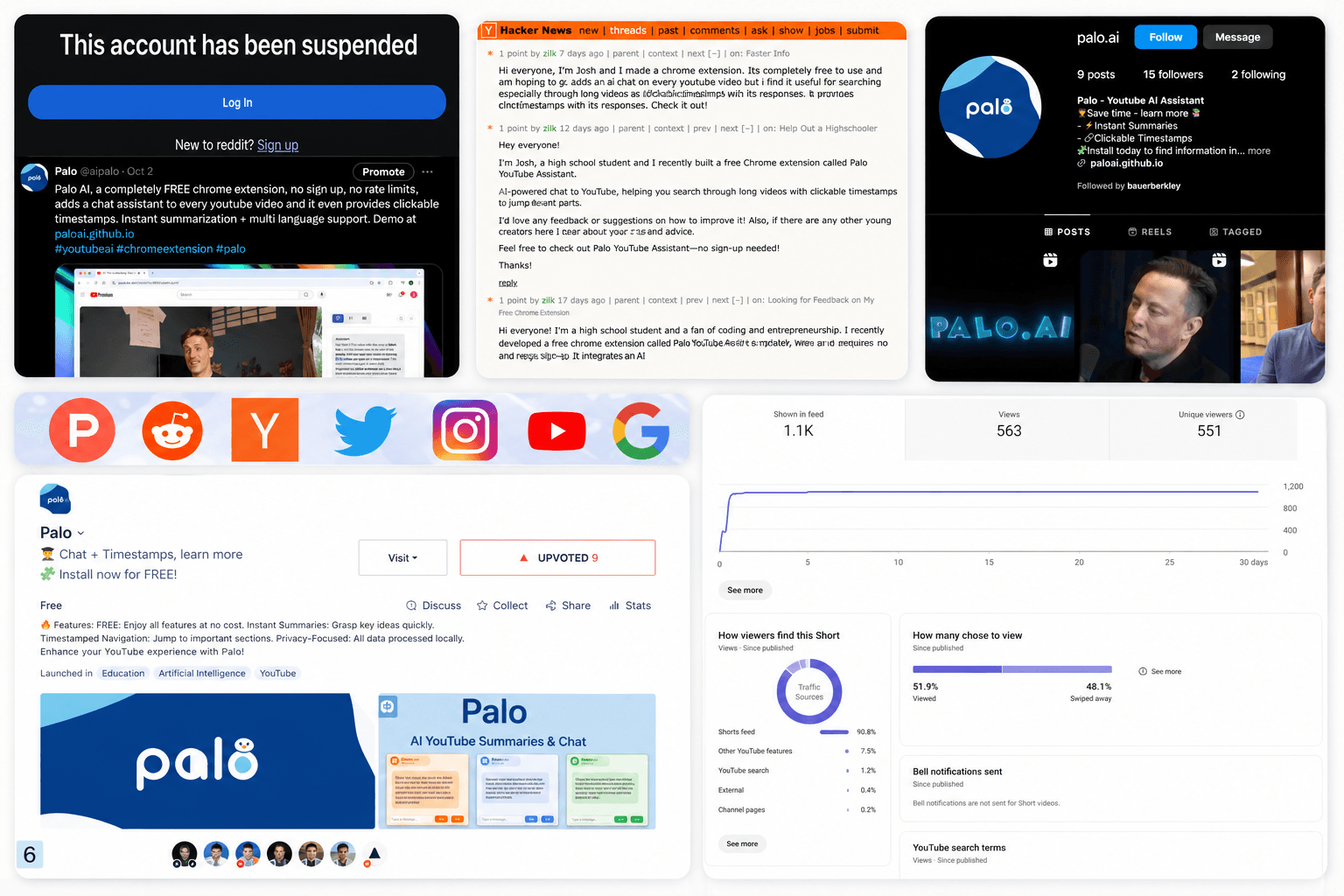
October 2024 launch snapshots: HN, Product Hunt, Instagram, Shorts, and one suspended X account. Oct 18, 2024 — the peak
The Google Analytics chart caught a short October spike on the Chrome extension page. It was a jagged line from zero to strangers actually opening the thing.
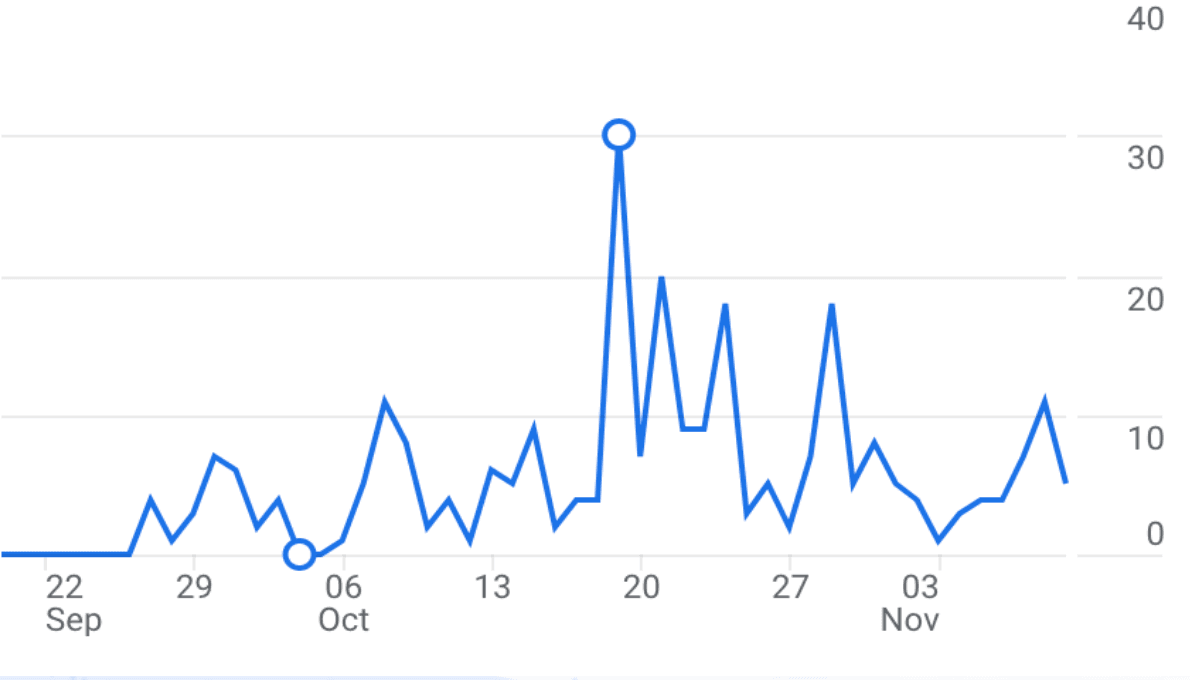
September–November 2024 Google Analytics snapshot of extension-page activity. Late Oct 2024 — Chrome Stats
A late-October Chrome Stats snapshot put Palo at 73 users and a 4.83 average rating across 6 ratings. Flat as a pancake (in a good way).
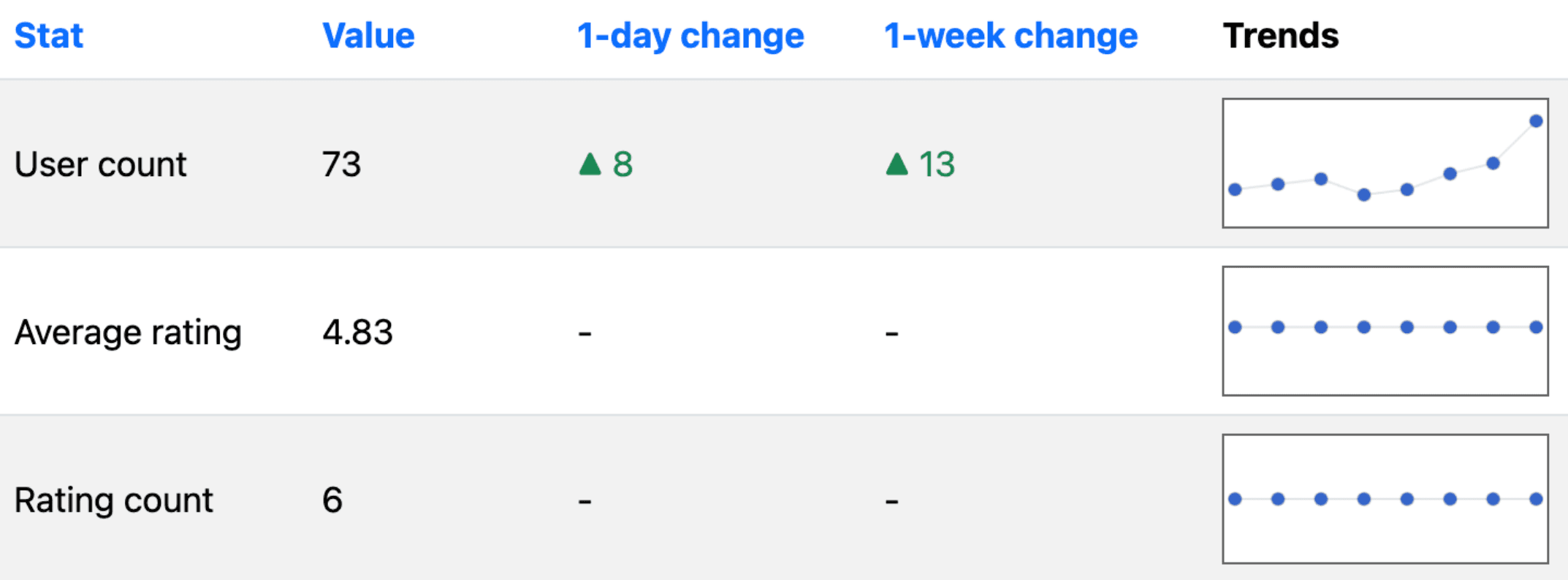
Late October 2024 Chrome Stats snapshot. Nov 2024 — plans at the time
The roadmap I sketched was bigger than the shipped product: prompt tuning, provider swaps, a Palo+ subscription through ExtPay, daily quotas, themes, dark/light mode, longer-video support, more languages, smart speed, and cleaner timestamp timelines. Most of it stayed future-tense once transcript access broke.
Summer 2025 — the transcript failure
The transcript source Palo relied on stopped returning data. The extension began showing a transcript-fetch error, and feedback reports repeated the same issue over the next couple of weeks.
Summer 2025 — transcript recovery
I tried a few external transcript sources until one started returning usable transcripts to the extension. Summaries and questions worked again, with another external source in the loop.
Gallery
Result
Late Oct 2024 snapshot: 73 users; 4.83 average across 6 ratings
What I learned
Shipping to real users is the part the side projects had been missing — a feedback form full of 'it's been broken for two weeks' hits differently than a localhost console.log. Palo's fragile part was transcript access: it depended on an external source that could stop working. When it did, the same error reached users, and getting back required finding another source. That's a product dependency, even when it looks like plumbing.