Departure
My calendar was only as good as the number of emails I remembered to translate into events. School sends deadlines, retakes, meetings, reminders, and schedule changes through Gmail first, and I was the unreliable middleware between inbox and calendar. Email2Calendar was the replacement: watch Gmail every 15 minutes, decide whether an email contains a real future event, extract the details with Gemini, and create the Google Calendar event before I forget.
Approach
- Google Apps Script
- Gmail API
- Google Calendar API
- Gemini 2.0 Flash
- Structured JSON output
Runs inside Apps Script quotas: 6 minutes per execution and 90 minutes total runtime per day. It has to be selective, idempotent, and fast enough to run on a 15-minute timer.
Field log
The whole product fit in three verbs: watch email as context, decide whether something is calendar-worthy, then add the event. Gmail held the source of truth; Google Calendar held the future. The missing piece was judgment.
Apps Script for Google account access, Gemini for event judgment. Every 15 minutes, Apps Script wakes up, checks recent Gmail threads, filters out anything already labeled CalendarApp_Processed, looks for the first unread message, asks Gemini whether it contains a concrete future event, and then writes to Calendar if the answer is yes. After success, it marks the message read and labels the thread so the same email does not become the same event twice.
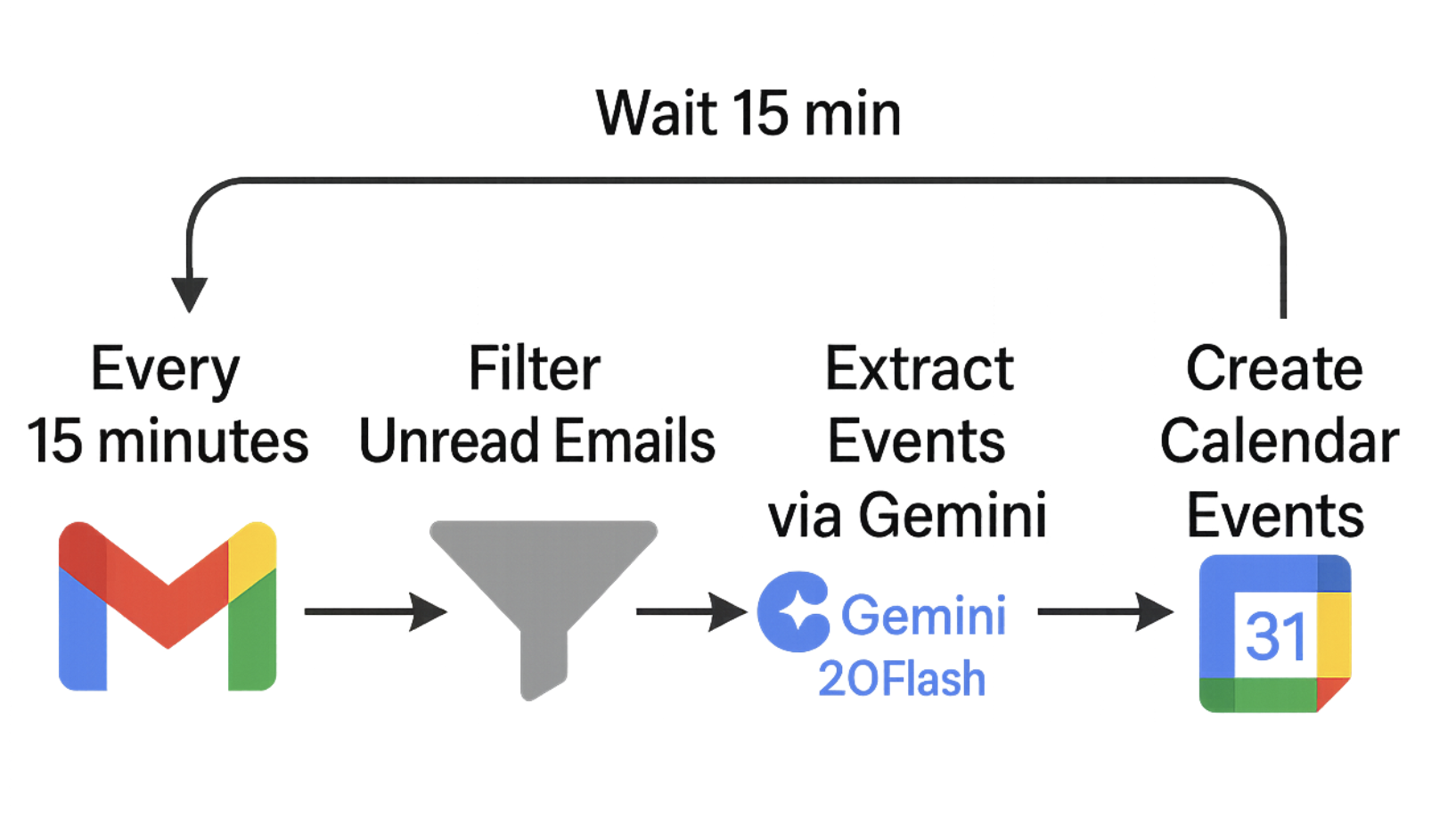
A tiny cron job with one job: inbox to calendar. Google Apps Script is not glamorous, but it is already inside the Google account boundary. It can read Gmail, write Calendar events, create labels, and install a timer trigger without standing up a server. For this task, boring was the point.
The model response was forced into a schema: add_event boolean, then event_details only when needed. Event details carried title, startTime, endTime, isAllDay, location, description, guests, and an eventTypeSuggestion for rough categorization. If the email was a newsletter, vague opportunity, past event, system notice, or simple confirmation, Gemini had to return add_event false.
The prompt included the current timestamp, the sender, subject, and trimmed email body, then told Gemini to resolve relative dates from that moment. Unless the email said otherwise, everything was treated as America/Chicago and converted to UTC before output. School shorthand got rules too: 'during flex' meant 2:35 to 3:00 PM.
Apps Script gives 6 minutes per execution and 90 minutes per day. A no-email run lasted about two seconds. At 96 runs a day, the idle loop used roughly 3.2 minutes total. Runs with a few candidate emails took closer to 15 seconds depending on Gemini, still comfortably inside the free limits.
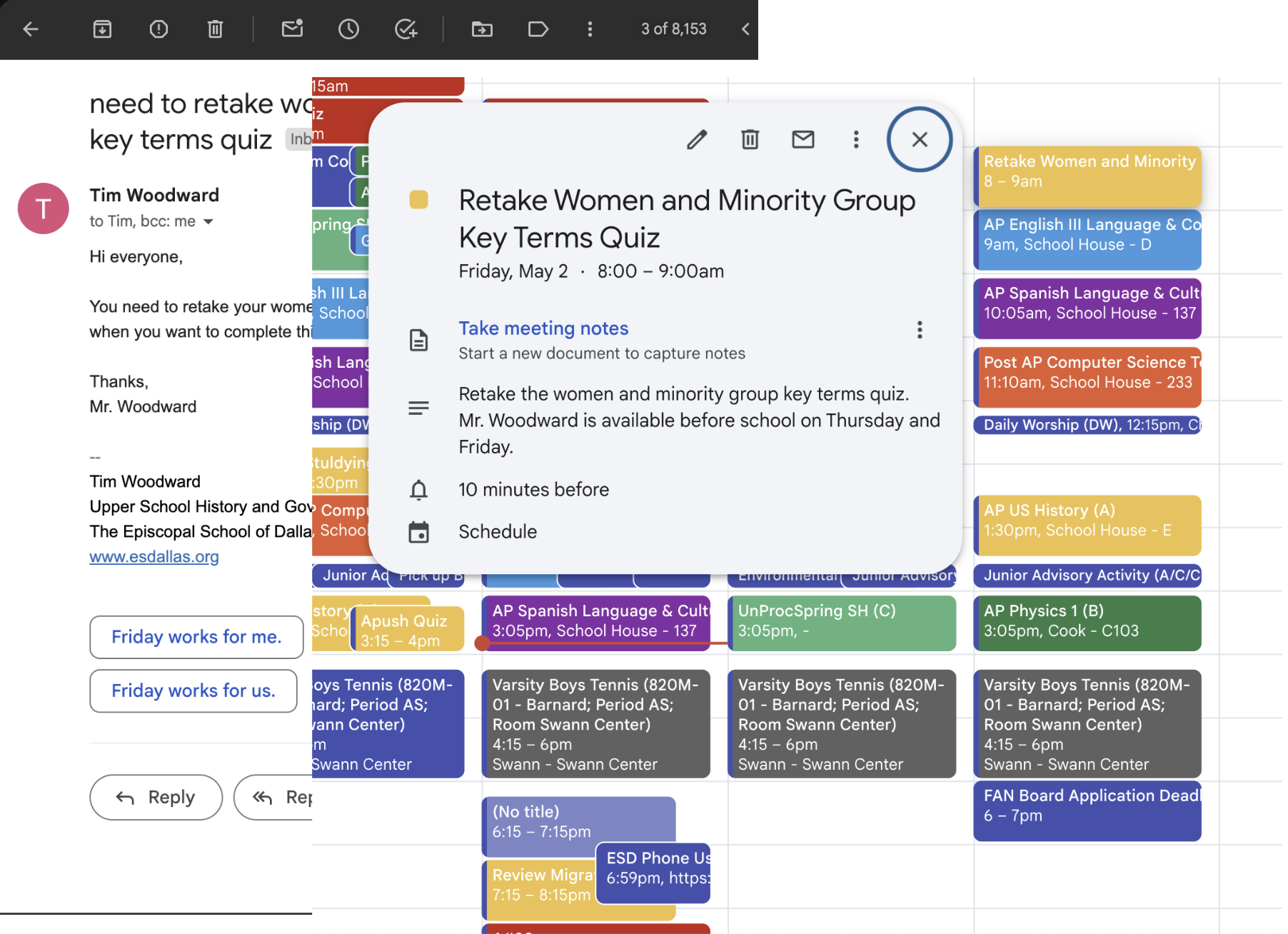
I was adding items to my calendar when I remembered I needed to retake an APUSH quiz. When I went to block Friday morning, the event was already there. Mr. Woodward had sent a reminder email, and Email2Calendar had quietly caught it.
The reminder email became a real calendar event. The obvious extensions were Schoology integration and sharper prompting. Gmail catches the messages adults send. Schoology catches the assignments systems publish. The useful version eventually needs both.
From the gallery
What I came back with
Private Gmail-to-Calendar Apps Script
Lesson from the terrain
The useful part of the LLM was not writing prose; it was making a bounded decision inside a strict contract. Does this email deserve calendar space, and if so, what exact times should exist? Apps Script handled the plumbing, labels handled duplicates, and Gemini handled the judgment. The fragile part is that judgment has to be conservative: a missed event is annoying, but a calendar full of false positives is worse because it trains me to stop trusting the calendar.